Pages

Monday, 15 June 2015

DOP Multiple Cloth Objects using Copy SOP

Multiple Cloth Objects can be created using the Cloth Object DOP, where the Initial Geometry contains multiple pieces of geometry, e.g.. Grids. (In many cases this geometry would be created by way of the Copy SOP). Actually to be more specific the key is Primitive Groups not so much pieces of Geometry, although those usually coincide.

Before continuing, I have to mention that although this process technically does as it says. The aim was to constrain each Cloth Object individually and dynamically(number of Cloth Objects). I have found it didn't give me the outcome I was looking for, ie. Constraints only work on a single Cloth Object, however I do think the may be a way, possibly using Copy Data DOP.

On the Creation tab of the Cloth Object DOP changing the following parameters:-

  • Number of Objects : This would contain an expression that equates to the number of copies required, this will depend on your particular setup. 
    • Pointing to the Number of Copies parameter of the Copy SOP using ch("your_copy_sop_location/ncy") would be one way.
    • Using the npoints("your_copy_sop_location") expression could also be used when there are Copy SOP Template Points being used
  • Object Name : "name_prefix" $OBJID   note : Quotes aren't required for the name_prefix 
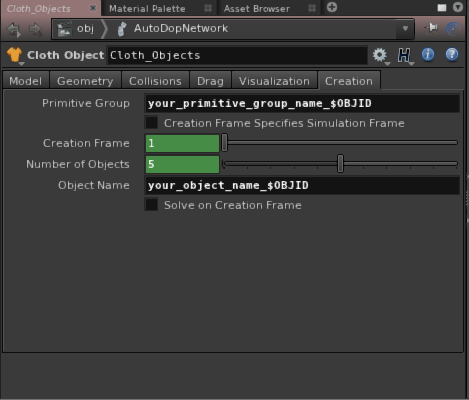

Now this setup so far will create x number Cloth Objects with exactly same Geometry! So the trick is to isolate the Geometry for each Cloth Object based on the Primitive Groups created in the SOP context, in this case by way of the Copy SOP. As you'll notice there isn't any Group or Primitive Group parameters on the Cloth Object. You can however add the appropriate parameter, by editing the parameter interface of the Cloth Object DOP you can add a parameter - Primitive Group. It can be found via the Create Parameters - From Nodes tab, expand +Cloth Object + clothconfigureobject1 + sopgeo_initialgeometry1(Geometry) + Primitive Group (primgroup). move the parameter to the Cloth Object Creation tab. Finally in the Primitive Group parameter place an appropriate group name followed by the object id variable : "your_primitive_group_name"`$OBJID`   note : $OBJID could be affected by other simulation objects


The following screenshots show the Cloth Object and Geometry Data before and after the changes. Notice the standard setup Cloth Object contains all the copied geometry points, apposed to the altered setup, has multiple objects which only contain a subset of geometry based on the primitive group/s.


Monday, 9 February 2015

Matrix Rotation

Here are 2 examples of using a matrix to perform rotation of an object about a pivot point, implemented in the VOP SOP context and VEX code in both the point and attribute wrangle nodes.


Monday, 19 January 2015

Get Primitive's Points with VEX

Note:
Code below was developed for Houdini 13
Since Houdini 14 the primpoints(int input, int @primnum); function returns an array of points per primitive. Obviously a much better solution


Attribute Wrangle in Detail Attribute mode

The following VEX code returns the points associated with the given primitive. In this case the primitive is chosen based on the proximity to the current point, using the xyzdist() function, where the first argument is the geometry containing the primitives to test against the current point, argument defined as "1" gives access to the second input of the attribute wrangle node.

i@prim;
v@uv;
float dist = xyzdist(1, @P, @prim, @uv);
//Above gets the prim(n) and prim(uv) for a given point position
//Also the distance between the given point and the prim returned
//Although all we really need is the primitive number

//--

//Create array to store the primitive's point numbers
int primpoints[];
v@primpoints;//This vector is used to store the 3 points instead of using an array, due to a limit with array attributes. 

NOTE:
Basically if you want to access the array in another wrangle further down the chain, you need to use a data type other than an array instead, a vector or matrix can be used to store array like data structures.

//Get the number of vertex for a given prim
int nvtx = primvertexcount(1, @prim); 

//Loop over the vertercies to find their associated points
for (int i = 0; i < nvtx; i++){

    //Get the linear vertex numbers for the prim(n)
    int linearvertex = vertexindex(1, @prim, i);

    //Get the point number from the linear vertex number
    int vertexpoint = vertexpoint(1, linearvertex); 

    //Put point numbers into the points array
    primpoints[i] = vertexpoint;
    @primpoints[i] = vertexpoint;
}

//Display primitive's point numbers
//printf("%g \n", points);

Tuesday, 25 November 2014

Mushroom Asset Development - Renders : GI

Initial mushroom renders.
Fairly basic light setup and the mantra surface shader.

Multiple camera renders:


Multiple object level copies of the mushroom asset, posed in world space simply for the purposes of render testing

Same again with addition of DOF

Thursday, 13 November 2014

Mushroom Gills - Radial Sorting

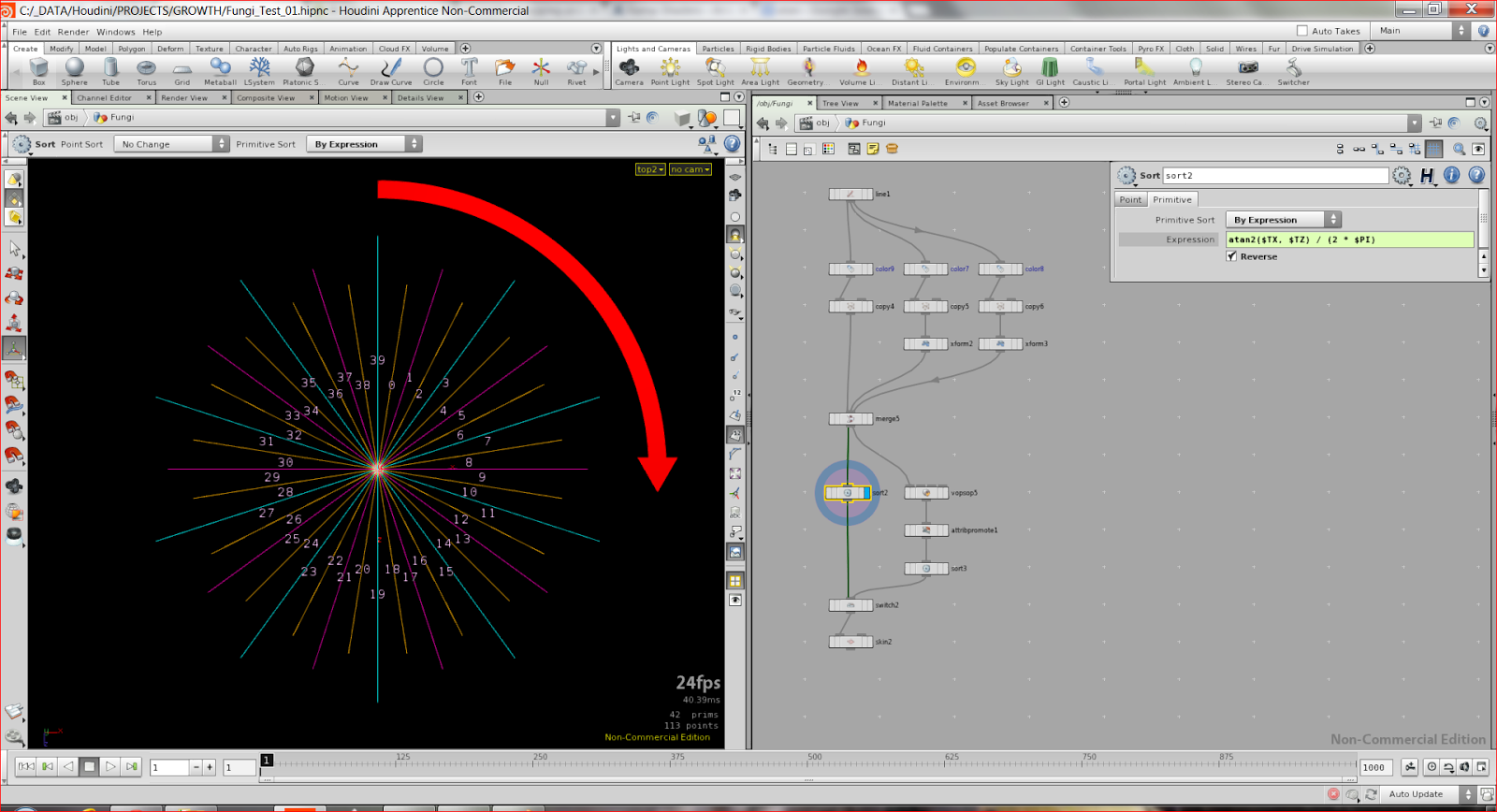
If you've ever needed to sort in a radial fashion, see below to find out how.

I've come against this problem countless times. It's come up again while creating the mushroom gills, so I thought it would be good to share the solution I've come up with.

The idea came when I was thinking about the angular gradient as a way to do radial sorting, I recalled the underlying formula for the angular gradient (shown below).

angularGradient = atan2($TX, $TZ) / 2 * $PI

Above you'll notice the $TX and $TZ, that will give us a circular / angular gradient about the Y Axis. Changing those position variables will give results about the other axis.

I might try to implement a VOP version which uses textures to do sorting in a similar way, be very handy to have a visual way to sort attributes.